
To hide non-relevant nodes, proceed as follows:
COMAN Mobile
Open the GANTT chart. Select Options. Enable or disable the "Show non-relevant tasks" option.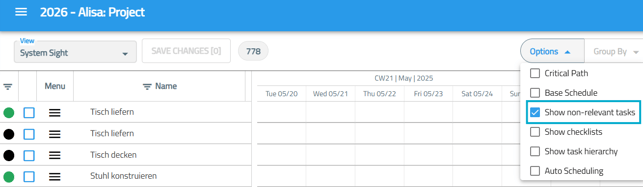
Depending on the selected setting, non-relevant activities will either be displayed or hidden in the GANTT chart. In the structure view, irrelevant nodes remain visible but are displayed in greyed-out form.
There is currently no option to completely hide irrelevant or inactive nodes in the structure view of COMAN Mobile.
COMAN Manager
In COMAN Mobile, irrelevant nodes can only be shown or hidden in the Gantt chart. To do this, open the Gantt chart and select Options.
To hide inactive nodes in the progress table:
Open the Progress Table. Right-click anywhere within the table. Select "Hide Inactive Nodes" from the context menu.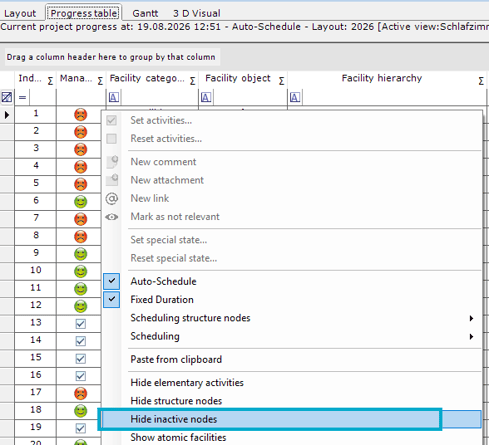
Inactive nodes will be hidden, resulting in a clearer and more structured view.
Another option for hiding irrelevant nodes is available in the top menu under View → Hide irrelevant node.
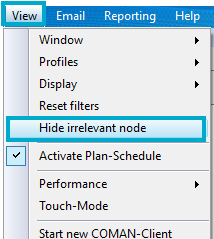
This hides irrelevant nodes throughout COMAN Manager, including the Layout, Progress Table, Gantt Chart, Attachments, and Activities in both Edit and View mode.